TeleChat — Live chat world

Your Website. Your Game.
Your AI-Powered Live Chat

Visitors chat on your site or inside your Unity game. AI answers instantly, you jump in from the Admin Dashboard's Chat Explorer when needed. Self-hosted, one-time payment, no limits.

AI-PoweredOpenAI, Claude, Gemini
Self-HostedYour Server, Your Data
Web + UnitySites & Games
Scroll

Everything You Need to Run World-Class Support

From real-time chat to AI-powered replies, admin dashboards, and in-game integration — all self-hosted on your server.

Real-Time Messaging

SSE-powered live chat between your visitors and your agent inbox. No WebSocket complexity, no polling — instant, seamless communication on every browser and platform.

AI Auto-Replies

Connect OpenAI, Claude, or Gemini. Your bot answers visitors instantly with context-aware responses. RAG-powered knowledge base included.

Admin Dashboard

Full Chat Explorer with live admin-to-visitor messaging. See all conversations, reply in real-time, toggle AI, manage your entire operation.

Knowledge Base & Brain Graph

Feed your bot with documents, FAQs, and custom data. Visualize knowledge connections with the interactive Brain Graph.

Fully Customizable Design

Colors, themes, bubble styles, prechat forms — tweak every detail from the admin panel. Match your brand identity with zero CSS.

100% Self-Hosted

Runs on your own $5/month server. No data leaves your infrastructure. No vendor lock-in. You own everything — code, data, and destiny.

Unity Game Integration

Native in-game chat client for WebGL, iOS, Android, and Desktop. WhatsApp-style UI with typing indicators and real-time SSE.

Team & Role Management

RBAC user management, budget controls, audit logs, and multi-site bot profiles. Built for teams that need control and visibility.

Zero-Code Setup Wizard

Browser-based guided setup — pick your AI provider, drop in an API key, connect Cloudflare Tunnel, paste the embed snippet, go live in under 10 minutes. No code, no config files to hand-edit.

Multilingual Mood Detection

Live sentiment analysis in 15 languages — English, Turkish, Spanish, French, German, Portuguese, Italian, Arabic, Russian, Chinese, Japanese, Korean, Dutch, Polish, Hindi. Color-coded chat rows, escalation alerts when an angry visitor needs you NOW.

Real-Time Escalation Alerts

The bot flags rage patterns, urgency keywords, profanity bursts the moment they land. Visual banner + native desktop notification. Sticky audit flag so supervisors can reconstruct what happened.

Multi-Brain Knowledge Bases

Organise documents into named brains (e.g. support-en, legal, brand-a). Bind one or many brains per site — a multi-brand operator runs one server, three bots, three knowledge scopes, zero cross-tenant leakage.

Internal Notes & Watchers

Drop private notes inside any conversation — your team sees them, the visitor never does. Live "who's viewing" presence so two agents don't double-reply.

File & Image Attachments

Visitors send screenshots and PDFs; agents reply with images, manuals, videos. Path-traversal safe, virus-conscious allow-list, 100 MB ceiling. Inline preview in the thread.

Backup Scheduler & Data Ownership

Automatic nightly backups of Postgres + uploads + config + knowledge base. Restore with one command. Your data, your machine, your S3 bucket — never ours.

Race-Safe Operations

Two agents click "Take" on the same chat at the same millisecond — only one wins, the other gets a clean "already assigned". Idempotent send (no double messages on network blips). Monotonic unread cursor (stale tab can't regress your read state).

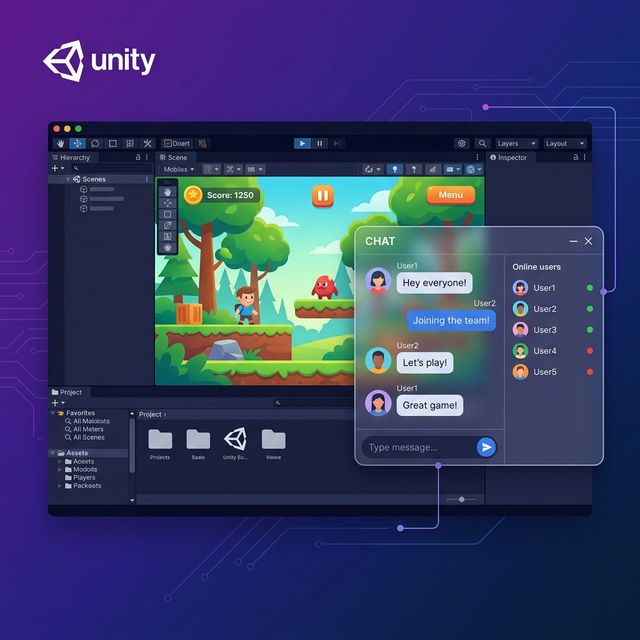
Game Integration

Works Inside Unity Games Too

Not just websites. Drop the Unity package into any game — players chat with you directly from inside the game, you reply from the Admin Dashboard's Chat Explorer. Same SSE feed, same conversation thread, same AI auto-reply.

One-Click Unity Package

Import the .unitypackage, set your server URL, and you're live. WhatsApp-style UI with typing indicators. Unity 2020+.

WebGL, Mobile & Desktop

Renders natively on WebGL, Android, iOS, Windows, and macOS. Real-time SSE connection on every platform.

In-Game Live Chat

Floating chat bubble that doesn't interrupt gameplay. Players tap to open, type a message, get a reply — AI or human.

Same Server, Same License

Connects to your existing TeleChat backend. No extra fees. Use a different data-site-id per game.

Included in Pro & Enterprise
TeleChat Unity Integration — Live chat inside Unity games

Live in 4 Steps, Under 25 Minutes

No coding required. From a fresh server to handling real visitors — faster than making coffee.

1

Grab a $5 Server

Any Ubuntu VPS works — Hetzner, DigitalOcean, Vultr, or your own machine.

2

One Command Deploy

Run docker compose up -d and you're done. PostgreSQL, Redis, everything spins up automatically.

3

Setup Wizard

Open /setup in your browser. Pick your AI provider, drop in an API key, customise your widget design.

4

Embed & Go Live

Paste a single <script> tag into your site. Visitors start chatting, AI replies in real time, your team takes over from the Admin Dashboard whenever you want.

No Subscriptions. No Surprises.

While competitors charge $45-$295/month, you pay once and keep it forever.

Basic

$98$49 one-time

For indie devs and side projects

  • Unlimited messages & visitors
  • Self-hosted on your server
  • Docker deployment (PostgreSQL + Redis)
  • One-line embed snippet (any website)
  • Real-time SSE messaging
  • File & image attachments
  • Idempotent, race-safe messaging
  • Automatic nightly backups
  • Unity in-game chat client
  • Setup Wizard
  • Admin Dashboard
  • AI auto-replies & mood detection
Get Basic — $49

Enterprise

$1,298$649 one-time

Full admin suite for teams & agencies

  • Everything in Pro
  • Full Admin Dashboard with Chat Explorer
  • Live admin-to-visitor chat (real-time SSE)
  • AI auto-replies — OpenAI, Claude, or Gemini
  • Multi-provider routing & failover
  • RAG knowledge base (PDF, DOCX, HTML, ZIP, URL import)
  • Multi-brain knowledge — one server, many tenants
  • Brain Graph entity visualisation
  • Multilingual mood detection (15 languages)
  • Real-time escalation alerts & rage-pattern detection
  • Internal notes & live watcher presence
  • App & Site Profiles (multi-brand bot routing)
  • User & Role Management (RBAC + audit log)
  • Budget controls & per-site AI spend caps
  • Reports & analytics (conversations, CSAT, spend)
  • Canned responses & keyboard shortcuts
  • CSRF + SSRF + path-traversal hardened
Get Enterprise — $649

Frequently Asked Questions

Everything you need to know before making TeleChat yours.

Do I need coding skills to set this up?

Not at all. Run one Docker command on a $5 server, then the browser-based Setup Wizard walks you through everything — AI provider + API key, widget design, embed snippet, Cloudflare Tunnel for HTTPS. Live in under 25 minutes.

How does the AI auto-reply work?

TeleChat Enterprise connects to OpenAI, Claude, or Gemini. When a visitor messages, the AI responds instantly using your Knowledge Base (RAG). You monitor every conversation in the Admin Dashboard's Chat Explorer and take over with one click — the AI pauses automatically when an agent replies, and resumes the moment the conversation is resolved.

What is the Admin Dashboard?

The Admin Dashboard (Enterprise) is a full web-based control center. It includes Chat Explorer for live conversations, AI Settings with multi-provider routing, Knowledge Base & Brain Graph for training your bot, Chat Design editor, App & Site Profiles, User & Role Management (RBAC), Budget controls, and Reports & Analytics.

Does it work with WordPress, Shopify, Wix, or custom sites?

Yes — any platform that supports HTML. Paste a single <script> tag before </body>. No plugins, no dependencies, no framework requirements. One line of code, any website.

Does TeleChat work inside Unity games?

Yes! Pro and Enterprise include a native Unity package (.unitypackage) with a WhatsApp-style chat UI. Players tap a floating button, type a message, the AI replies in real time, and your team takes over from the Admin Dashboard whenever they want. Works on WebGL, iOS, Android, Windows, macOS. Real-time SSE connection, typing indicators, date separators — all built in.

How is this different from Tawk.to, Crisp, or Tidio?

(1) You pay once — they charge $45-$295/month, forever. (2) Your data stays on your server — they store every conversation, dossier, and uploaded document on theirs. (3) Built-in AI with YOUR OpenAI/Claude/Gemini key — they charge extra per AI reply or lock it behind their highest tier. (4) Multilingual mood detection + escalation alerts in 15 languages — they don't. (5) Multi-brain knowledge with per-site allow-lists — they don't. (6) Works inside Unity games — they don't.

Is there a limit on visitors or messages?

Zero limits. TeleChat runs on your own server — no artificial caps. A $5 VPS handles 500+ concurrent visitors. Need more? Just upgrade your server, no license changes needed.

What about HTTPS and security?

Built-in Cloudflare Tunnel provides free HTTPS without opening ports. The admin API uses JWT auth with rate limiting. Enterprise adds RBAC user management, audit logs, and budget controls for full team security.

What's the difference between Basic, Pro, and Enterprise?

Basic: Self-hosted core — Docker deploy, real-time SSE messaging, file attachments, idempotent / race-safe operations, nightly backups. Pro: adds the Setup Wizard, Unity game client, Cloudflare Tunnel (free HTTPS), widget design wizard, and 30-day email support. Enterprise: adds the full Admin Dashboard with Chat Explorer, AI auto-replies (OpenAI/Claude/Gemini), RAG knowledge base, multi-brain support, Brain Graph, multilingual mood detection + escalation alerts, internal notes & watchers, multi-site profiles, RBAC team management with audit log, budget controls, canned responses, and reports.

What if I need help after purchase?

Pro includes 30-day email support. All tiers include documentation, the interactive setup guide, and future updates.

Which languages does the bot understand?

AI replies work in every language the connected provider supports (OpenAI / Claude / Gemini cover 95+ languages). The mood detection layer ships first-class lexicons for 15 languages — English, Turkish, Spanish, French, German, Portuguese, Italian, Arabic, Russian, Chinese, Japanese, Korean, Dutch, Polish, Hindi — so the operator sees colour-coded sentiment + escalation alerts on visitors in those languages. The Chat Explorer UI itself is English; visitor + agent messages render in any UTF-8 script (CJK, RTL, Cyrillic, Devanagari) out of the box.

Can one server power multiple bots / brands / sites?

Yes — Enterprise's multi-site profiles + multi-brain knowledge are designed for it. One install hosts many sites, each with its own widget design, AI system prompt, allow-listed knowledge brains, and operator team. A site bound to brain-a only reads brain-a's documents — no cross-tenant leakage. Strict scope filters at the chunk level + an audit-tested isolation contract (the Postgres + file-vector layers BOTH enforce the allow-list, no SQL-WHERE-only trust).

What does the mood detection actually do?

Every visitor message is scored on polarity (−1…+1), intensity (0…1), urgency tier (low / medium / high / critical), and emotion (happy / frustrated / angry / sad / anxious / confused / neutral). Two-tier pipeline: a 50-µs on-prem lexicon classifier runs first; an optional LLM Tier-3 re-verifies low-confidence or critical hits using your chosen provider. The Chat Explorer row paints its colour from the live aggregate, the badge shows the emotion, a red banner pops if a critical signal lands. Sticky audit flag preserved so a supervisor can reconstruct what happened even after the visitor calmed down.

Can visitors and agents share files?

Both directions. Visitors send images and PDFs from the widget; agents reply with images, video, manuals — anything up to 100 MB per file. URLs are signed and routed through an allow-listed proxy (path-traversal blocked, only /api/uploads/* persisted), and the thread renders inline image previews. Internal notes can carry attachments too — useful for sharing a one-page playbook with a colleague mid-conversation.

How do internal notes work?

Toggle the composer from Reply to Internal note — the message lands in the thread with a dashed amber border, every agent on the team sees it, the visitor never does (visitor SSE filter is default-deny by allow-list). Great for "this customer escalated last week, be careful" tags, or for a senior agent leaving a one-line answer for a junior to send.

What happens to my data if I cancel? Vendor lock-in?

Zero. There's nothing to cancel — you bought a one-time license, the code runs on your server, the database is your Postgres. Daily backups land in your filesystem (or any S3-compatible bucket you configure). Export the database, walk away, run the same install on a new VPS — the export reads back identically. No "vendor cloud", no "we keep your conversations" — your machine is the canonical store.

How does the team see who's working on what?

Chat Explorer surfaces live presence (who's online), typing indicators (per agent + per visitor), watchers (everyone currently viewing this chat), and a race-safe assignment system — two agents click "Take" on the same conversation at the same instant, only one wins, the other gets a clean message instead of a silent overwrite. Keyboard shortcuts (J/K next/prev, R reply, E resolve, I toggle AI) keep an experienced operator at ~3 chats a minute.

How do I train the AI on my docs?

Knowledge Base page → drag-drop PDFs / DOCX / HTML / ZIP archives, or paste URLs and the importer fetches them (with SSRF + content-type guards so a bad URL can't poison the index). Documents auto-chunk, embed against your chosen provider, and land in a brain you pick from the chip strip. Need a separate brain per product line? Click New brain, give it a name, drop documents in. Bind the brain to a site under Apps & Sites → Knowledge.

Ready to Chat Smarter?

Join hundreds of teams who replaced expensive SaaS subscriptions with TeleChat.

Get TeleChat Now